Reasons to choose WordPress for your website

Reasons to choose WordPress for your website

First of all, to give you an idea, more than 60% of websites are built with WordPress.

WordPress is a CMS that makes content creation and publishing easy. In other words, it’s a ready-to-use platform that lets you build your own website even if you know little or nothing about coding, design, or usability.

If you’re a professional, WordPress also empowers you to build truly remarkable projects—Spotify is a great example. In fact, major websites like Skype, Forbes, Vogue USA, The New York Times, and The Walt Disney Company are all powered by WordPress.

5 reasons to choose WordPress for your website

1. It’s the most complete CMS:
If you want a professional website with a unique, fully customizable design, WordPress is the way to go. You can add subscription forms, contact forms, membership areas, and countless plugins to make your site more attractive and functional.

2. It adapts to all devices:
These days, we browse the web more on our phones than on computers. That’s why it’s crucial for your site to work perfectly on mobile and tablet. WordPress makes this easy, offering responsive themes and plugins to ensure your website looks great on any device.

3. You can have an online store for free:
Thanks to the free WooCommerce plugin, you can set up an online store easily. It allows you to sell both physical and digital products, create discount coupons, and much more.

4. It improves your website’s SEO:
WordPress is one of the best CMS platforms for organic search ranking. Its coding structure is very search-engine-friendly, helping your content get indexed quickly by search engines like Google.

5. It’s easy to use:
WordPress has a very gentle learning curve. You don’t need to know any programming to use it. Its intuitive admin panel lets you quickly gain full control over your site.
Designed with ♥ by Unika Estudio | © 2020-2025 All rights reserved.
How to know if it’s time to redesign your website

How to know if it’s time to redesign your website

When you launch a website, it feels like it’s the most beautiful, functional, and modern site ever—and you assume it will always stay that way. But have you ever wondered what a website’s “expiration date” is?

Whether you like it or not, there will come a time when your website needs a redesign. Just like physical spaces—and really, everything in life—your virtual space will need to adapt to improve functionality and usability.

How often should you update your website?

The truth is, there’s no exact formula—you’ll know when it’s time to redesign your site. How? It’s simple.

To determine if it’s time for a redesign, you need to pay attention to certain aspects that you can easily spot yourself. For example: Does your website still represent you? Have you reinvented your business? Have you added new products or services?

In this article, I’ll share the 5 warning signs that indicate it’s time for an urgent design update.

How to know if it’s time to redesign your website: 5 warning signs you need a design update

Your users get lost on your website:

Do your users often write to you saying they can’t find a certain service or don’t know how to buy a product? Having a beautiful website is essential, but having a functional site with good navigation is even more important.

User experience should be intuitive, allowing visitors to quickly understand what you offer, your value proposition, and your services. Make sure to feature your value proposition and the solutions you provide right on the home page, and include a clear top menu with sections like “Services,” “About,” or “Courses,” depending on your case.

Your brand image and offerings have changed:

If you’ve updated your brand, you definitely need a new web design. Changing your business image takes time and careful planning, but it’s an exciting process that requires adjustments across all your platforms. If you’ve added new services or shifted your focus, it’s crucial that your website reflects this. Even a simple redesign communicates to your users and potential clients that your business has evolved.

Your website isn’t optimized for mobile devices:

This point is extremely important. If your site isn’t mobile-friendly, it was already overdue for a redesign—at least eight years ago (and I’m not exaggerating!). Web traffic from smartphones keeps growing. If someone visits your site on their phone and can’t navigate properly, you’re losing potential clients.

Your website loads too slowly:

When websites take longer than ten seconds to load, users tend to leave. Yes, ten seconds is almost all the patience an internet user has before clicking the “X.” In my case, it’s more like five seconds, haha. Your visitors need to access your site quickly and find the information they’re looking for in the shortest time possible.

Load time is a technical aspect related to your site’s architecture: oversized images, poor content organization, pages overloaded with unoptimized graphics, too many animations, or slow hosting—all add seconds that hurt performance.

Aim for a website with concise, focused information rather than overwhelming users with too much content.

You don’t have testimonials or a portfolio:

Social proof is crucial. Most people buy something because they’ve heard great things about the product or service. Include a section on your site with positive client reviews to build trust and strengthen your brand image. If you have a portfolio, add it as well—everyone wants to see your work history before hiring you.

Designed with ♥ by Unika Estudio | © 2020-2025 All rights reserved.

Web design glossary: everything you need to know

Web design glossary: everything you need to know

As a digital entrepreneur, and even as a web designer, you can sometimes feel like people are speaking another language when they mention certain web design terms. It happens because sometimes we haven’t given a name to something we already know, or because the term we use isn’t the same in every country.

My clients often feel shy about asking me what Hosting and Domain mean because they think they should already know—but honestly, when I started, I had no idea either.

If you’ve decided it’s time to have your own website, this glossary has everything you need to know. By learning these terms, you’ll be able to express yourself more confidently with your designer (whether that’s me or someone else you hire), and make sure they understand exactly what you want to achieve.

Web glossary: everything you need to know to communicate with your designer (and not lose your mind in the process)

Domain: A domain is a unique name that identifies your website on the Internet so it can be visited by any user. Example: unikaestudio.com

Hosting: The server where all your website content is stored. Think of it as the “rent” your site pays to exist on the Internet.

Backup: A backup (or safety copy) is a copy of all the files and data that make up your website, so you can restore it in case something goes wrong.

Call to Action (CTA): The element that tells users what action to take on your site—buy, book, call, etc. On a webpage, the CTA usually appears as a button or link with text that encourages people to click and take the desired action.

Captcha: Small tests that check if the person using the computer is a human and not a robot. They help prevent spam and junk submissions.

SSL Certificate: A digital certificate that authenticates your website’s identity. Basically, it tells your visitors that your site is 100% safe. (It’s the little padlock you see next to the URL).

CMS: A CMS (Content Management System) is software that allows you to edit and manage your website content. One of the most popular is WordPress, which is the one I use.
Fun fact: Big companies like Forbes, Spotify, The New York Times, and MTV News use WordPress.

Favicon: The small icon that represents your site in browser tabs, bookmarks, or shortcuts on a device’s home screen.

FAQ: Stands for Frequently Asked Questions. This section is where you answer the most common questions people have.

Footer: The bottom section of a webpage, usually containing elements like social media buttons, navigation links, legal information, etc.

Header: The top section of a webpage. It usually includes the logo, menu, search bar, and sometimes business info.

Landing Page: A focused page designed to highlight something specific, like a new product, promotion, or service. Its goal is to convert visitors into leads or customers.
Unlike a regular website page, which has many options and information, a landing page has a single purpose: getting users to leave their details for a potential sale.

Responsive: Refers to a design that adapts to different devices (desktop, tablet, mobile). The system detects the screen width and adjusts all page elements to provide a better user experience.

Wireframe: A layout or sketch that visually represents the structure of a webpage. It helps define the content and positioning of blocks before the design phase.

Designed with ♥ by Unika Estudio | © 2020-2025 All rights reserved.
The best free high-quality stock image sites

The best free high-quality stock image sites

Photos are a key element in a brand’s communication. When used correctly, stock images can bring your ads, blog posts, and social media content to life.

There are plenty of stock photo sites that offer free images, but have you noticed that many of them seem to use the same photos? Or that you actually can’t use the images however you want because of certain license restrictions? This is an issue even with paid stock photo sites like Shutterstock.

In this article, I want to share my 5 favorite sites that will help you find the images you’re looking for and make your work easier.

5 free high-quality stock image sites

Kaboompics

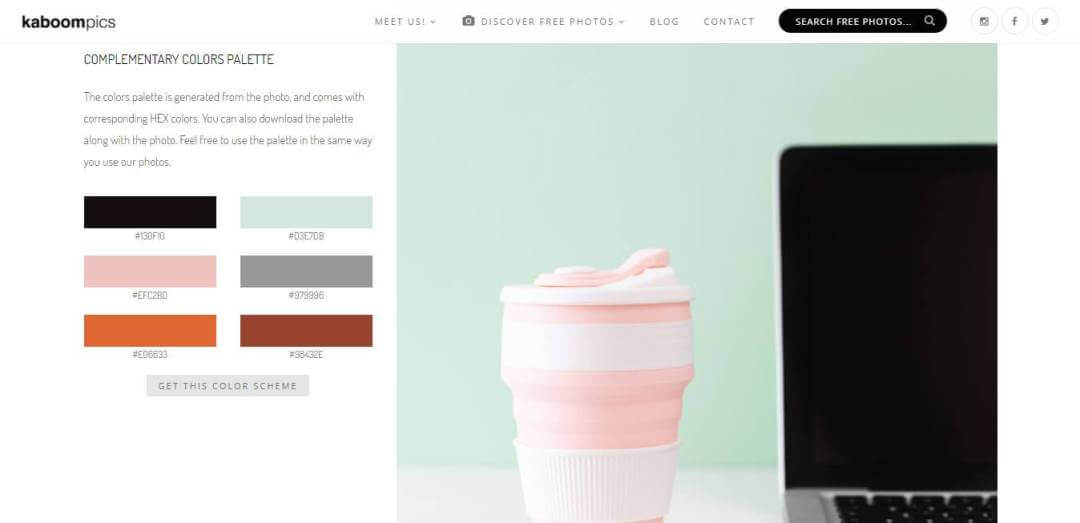
What I like most about Kaboompics is that their stock photos come with a matching color palette, which is perfect if your project relies heavily on photography but doesn’t yet have a defined branding. It’s also very unlikely that you’ll find the same photos elsewhere—whether landscapes, interiors, people, you name it, they’ve got it. On top of that, there’s a featured category where you can find the most downloaded images of the day.

Unplash

I absolutely love this site. The best thing about Unsplash is that it’s such a huge library that you’ll almost certainly find an image that fits your needs. Even better, you don’t need to double-check each photo for specific license details (everything is free), which saves you a ton of time when working on large projects.

Pexels

Pexels is so easy to use that you’ll know within seconds whether they have the right image for your project or not. One of the unique features this stock site offers is the discover section, where you’ll find curated collections of related images. This is super helpful if you’re not entirely sure what type of image you’re looking for, since it can give you plenty of inspiration.

Pixabay

All content is published under the Creative Commons CC0 license, which makes it safe to use without asking for permission or compensating the artist (even for commercial purposes).

Pixabay allows you to search by file type (photos, illustrations, vectors, videos), so you can really narrow down your search. The quality and originality of the photos on this stock site are truly amazing.

Rawpixel

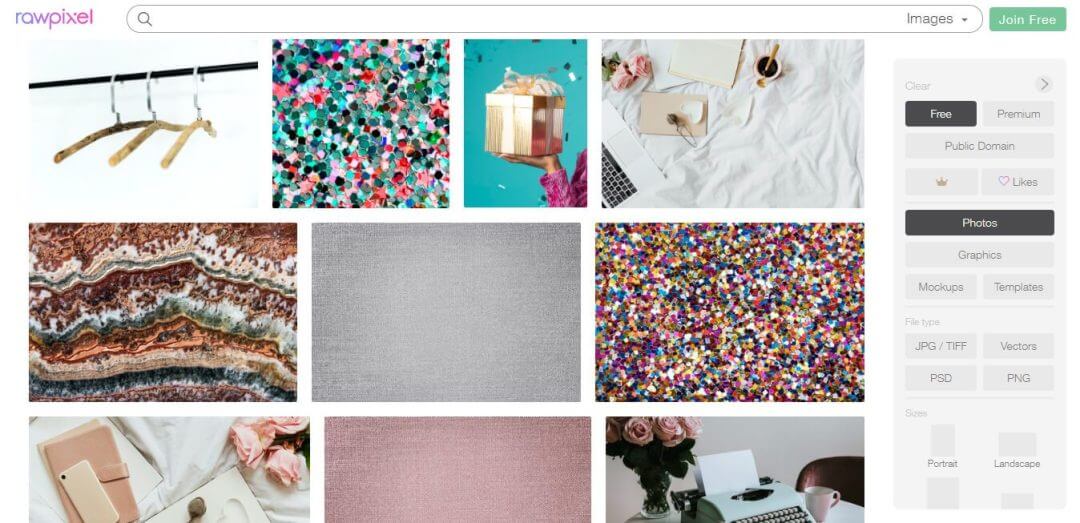
Whenever someone asks me where I got an image, the answer is almost always Rawpixel. It’s a mix of free and premium images, but you can usually find some real gems that will keep you coming back whenever you need stock photos for a project.

They offer everything from stock photos and vectors to icons, portraits, and even adult coloring book images. Another great feature is the ability to filter by size (portrait, banner, Pinterest, Instagram Story), which makes it super practical.

Designed with ♥ by Unika Estudio | © 2020-2025 All rights reserved.